 Menda
Menda
Win 10 / 11 · Windows
Check whether your PC can run Windows 11
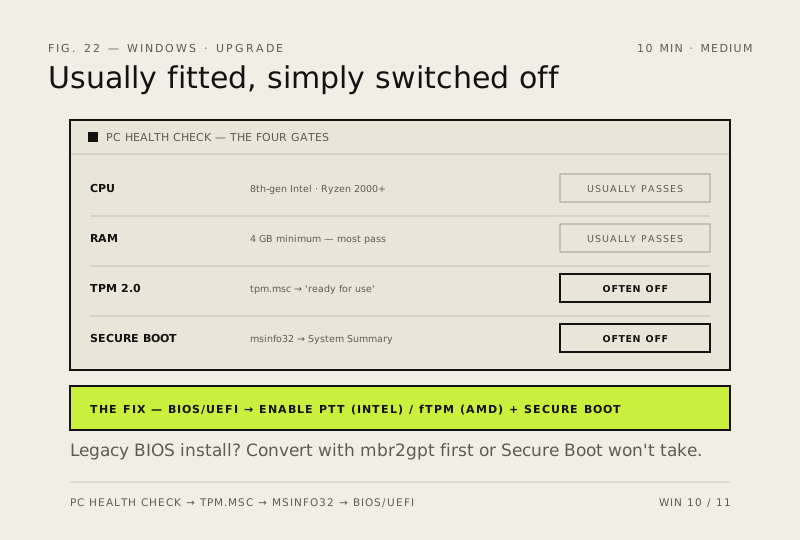
Most machines from 2018 onward qualify. The two things that usually block the upgrade — TPM 2.0 and Secure Boot — are often already fitted and simply switched off in the BIOS.
- DifficultyMedium
- Time10 min
- RiskLow
- ReversibleYes
- PlatformWin 10 / 11
- Updated
What that means
Low risk. This fix only checks things, or changes settings you can switch back in the same place. This change is reversible — you can return to the previous state without professional help or data loss.
Steps
-
Let Microsoft's own tool name the blocker
Why?
Microsoft's published requirements are a 1 GHz or faster 64-bit processor with two or more cores from its supported list, 4 GB of memory, 64 GB of storage, UEFI firmware that is Secure Boot capable, TPM 2.0, and a DirectX 12 capable graphics card.
-
Check the TPM
You should see: Status reads ready for use and the specification version is 2.0.
Why?
Microsoft counts firmware TPM towards the requirement — Intel PTT, AMD fTPM, a discrete module on the motherboard header, or an integrated security processor such as Pluton all qualify.
-
Check Secure Boot and the firmware mode together
You should see: BIOS Mode: UEFI and Secure Boot State: On is the combination Windows 11 wants.
Careful: If BIOS Mode says Legacy, do not enable Secure Boot in firmware and hope. The PC will stop booting. The disk has to be converted from MBR to GPT first — that is a separate, higher-risk job with its own fix.
-
Switch on what is merely switched off
You should see: tpm.msc and msinfo32 now report what step 2 and step 3 were looking for.
Why?
Turning these on costs nothing and changes nothing about how the PC behaves day to day — on most machines from 2018 onward they were simply never switched on.
-
Decide what to do with the answer
How to verify the fix
PC Health Check names no remaining blockers, tpm.msc reports a ready TPM at specification version 2.0, and msinfo32 shows Secure Boot State: On with BIOS Mode: UEFI.
If this didn't fix it
PC Health Check still names the processor as the blocker — that is not a setting and cannot be switched on; the machine is genuinely unsupported. If msinfo32 shows BIOS Mode: Legacy, Secure Boot cannot be turned on until the disk is converted — see the MBR to GPT fix rather than enabling it and hoping.
Next stop: the related fixes below, or start a guided diagnosis.