 Menda
Menda
Win 10 / 11 · Everyday how-tos
Clipboard history: get back what you copied an hour ago
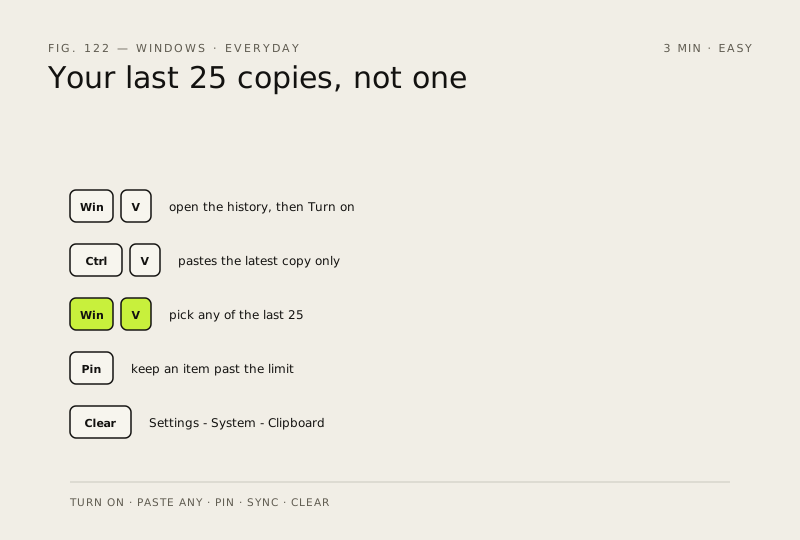
Turn on clipboard history and Windows keeps your last 25 copies, not just the most recent one. Windows + V brings the list back.
- DifficultyEasy
- Time3 min
- RiskLow
- ReversibleYes
- PlatformWin 10 / 11
- Updated
What that means
Low risk. This fix only checks things, or changes settings you can switch back in the same place. This change is reversible — you can return to the previous state without professional help or data loss.
Steps
-
Switch it on — it is off until you do
You should see: A small panel near the taskbar, either offering Turn on or listing what you have copied.
Why?
Nothing you copied before switching it on is recoverable — the history starts from the moment you enable it.
-
Paste anything from the last 25 things
You should see: The item you clicked appears at your cursor.
-
Pin the things you paste every day
Why?
This is the part that turns clipboard history from a nice trick into something you use daily: three or four pinned snippets you would otherwise retype.
-
Carry the clipboard to your other PCs
Optional, and it needs the same Microsoft or work account signed in on each device
Windows 11
Windows 10
You should see: Text copied on one PC pastes on the other.
Careful: Syncing sends what you copy to Microsoft's service so another device can receive it. If you copy passwords or bank details, leave this off, or use the manual option so nothing travels unless you ask it to.
-
Clear it after you copy something private
You should see: The next Windows logo key + V shows an empty history (apart from anything pinned).
Also see: Turn on full-disk encryption (BitLocker)
How to check it worked
Pressing Windows logo key + V opens a panel listing things you copied earlier, and clicking one pastes it.
If it didn't work
The panel opens but is empty: history only records what you copy AFTER you switch it on, so copy two or three things and look again. Nothing happens at all on a work or school PC — clipboard history can be turned off by whoever manages the machine, and that is not something you can override.
Next stop: the related fixes below, or start a guided diagnosis.