 Menda
Menda
Win 10 / 11 · Windows
Windows Start menu or taskbar not responding: restart it
A Start menu that will not open, or a taskbar that ignores every click, is the Windows shell hanging rather than the whole PC. Restarting one process brings it back without a reboot.
- DifficultyMedium
- Time10 min
- RiskLow
- ReversibleYes
- PlatformWin 10 / 11
- Updated
What that means
Low risk. This fix only checks things, or changes settings you can switch back in the same place. This change is reversible — you can return to the previous state without professional help or data loss.
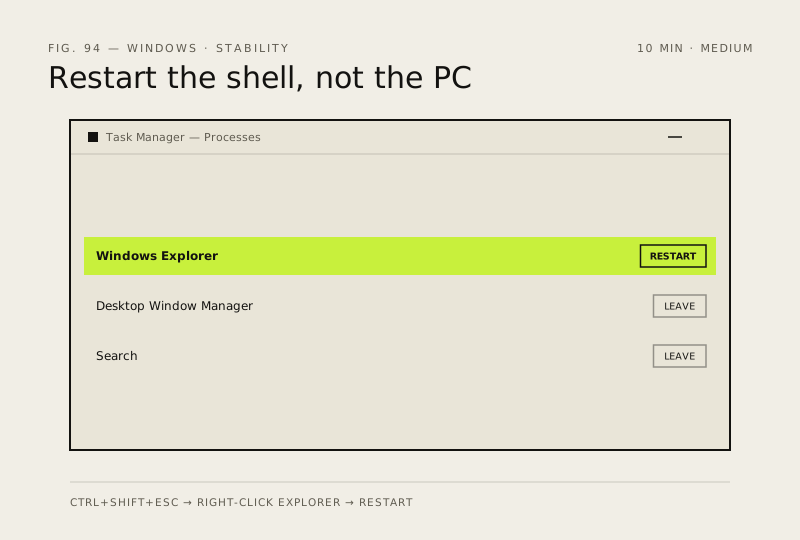
Steps
-
Open Task Manager — it works when nothing else does
Why?
The Start menu and the taskbar are drawn by the Windows shell, not by Windows itself. The rest of the PC is almost always running normally underneath.
-
Restart the shell
You should see: The taskbar redraws and Start opens on the first click. This alone fixes most cases.
Careful: Choose Restart, never End task. Ending it closes your desktop and leaves you with no taskbar and no obvious way back — you would have to start explorer.exe again by hand from Run new task.
-
If it hangs again within minutes, get a fresh session
Why?
Signing out rebuilds the shell from scratch against your profile and is quicker than a full restart. A shell that dies again within minutes is a sign the fault is deeper than one hung process — keep going.
-
Repair the system files, in Microsoft's order
You should see:
DISMreports success andsfccompletes its verification pass.Why?
Microsoft's documented order is
DISMbeforesfc:DISMrepairs the component store thatsfcdraws its replacement files from, so runningsfcfirst can fail for want of a clean source. A damaged shell file is a common result of a failed update.Also see: Repair corrupted system files
-
Work out whether it's Windows or just your profile
Windows 11
Windows 10
You should see: Start and the taskbar behave normally in the new account — which tells you the fault is your old profile, not Windows.
Careful: Don't delete the old profile until everything is copied out and checked: deleting a profile takes its data with it. Microsoft also says not to turn on showing hidden or protected operating-system files while copying, and warns some apps will need reconfiguring or reinstalling under the new account.
How to verify the fix
Start opens on the first click, taskbar icons respond immediately, and the shell survives a full working session without hanging again.
If this didn't fix it
If Start works in a new account but not yours, the profile is damaged and moving your files across beats trying to repair it. If it fails in both accounts even after DISM and sfc both complete cleanly, the next step is a reset that keeps your files rather than more shell troubleshooting.
Next stop: the related fixes below, or start a guided diagnosis.