 Menda
Menda
Win 10 / 11 · Maintenance
Connected but no internet? The safe DNS and stack reset
Wi-Fi connected, little globe with a slash — the link is up but the path to the internet isn't. A safe, fully reversible stack reset fixes most of it.
- DifficultyMedium
- Time10 min
- RiskMedium
- ReversibleYes
- PlatformWin 10 / 11
- Updated
What that means
Medium risk. This fix changes system settings, services, drivers, startup items or security features — reversible, but taking it back takes some effort or knowledge, and it may temporarily affect stability. This change is reversible — you can return to the previous state without professional help or data loss.
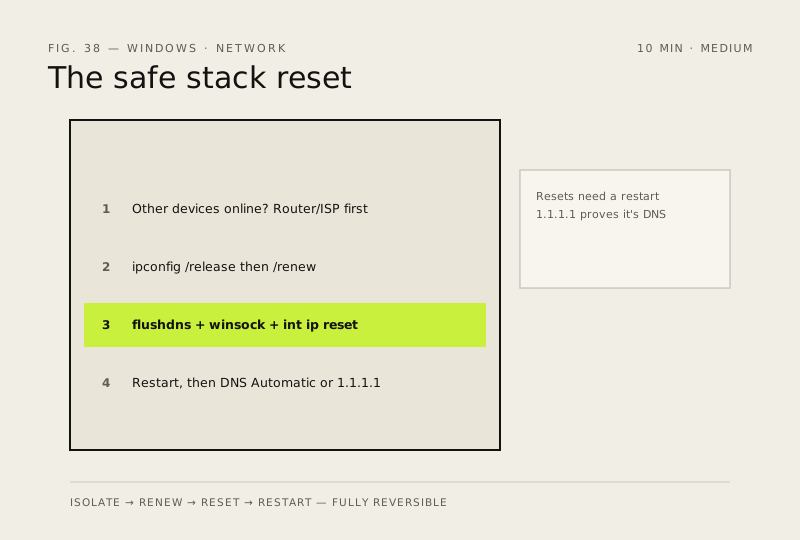
What usually goes wrong
- netsh winsock reset strips out layered networking software. VPN clients, some antivirus and older virtual adapters can stop working afterwards and need reinstalling — know which VPN you rely on before you run it.
- If the adapter had a manual IP or DNS set for a work network, a printer or a media server, these resets discard it. Note those settings down first.
- Both resets need the restart to take effect. Skip it and the stack sits half-configured, which looks exactly like the reset having failed.
- If switching to a public resolver like 1.1.1.1 fixes it, don't just leave it there and move on — your router or ISP resolver is the actual fault, and it's affecting every other device in the house too.
Steps
How to verify the fix
Open two different websites and confirm pages load normally with the correct content — not just the browser's offline error page.
If this didn't fix it
Still no internet after the stack reset — if other devices are also offline it's the router or ISP, not this PC; quote them your speed-test numbers from 'Slow internet? Run the five-minute test'.
Next stop: the related fixes below, or start a guided diagnosis.